Have Any Question?
+86 15018094056
Our Working Hours?
7 * 24h
Our Email?
service@evyny.com
+86 15018094056
7 * 24h
service@evyny.com
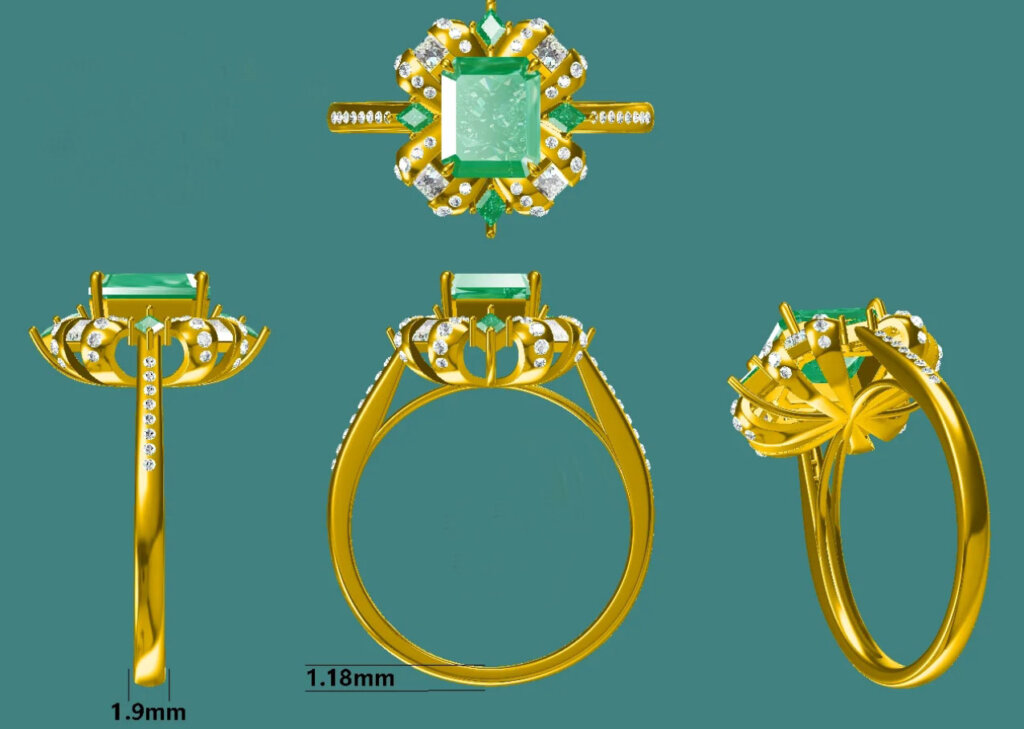
If you’re new to the jewelry industry or just starting to bring your design ideas to life, one term you’re going to hear again and again is Jewely CAD—short for Computer-Aided Design. CAD has revolutionized the way jewelry is developed, allowing designers to visualize their pieces in 3D and make precise technical decisions long before any metal is cast or stones are set.
In this article, we’ll walk through what jewelry CAD is, why it’s critical to get your CAD file perfect before production, and what you need to prepare to ensure the process is smooth, cost-effective, and aligned with your creative vision. Whether you’re a first-time designer or a growing jewelry brand, these tips could save you serious time and money.
CAD is a software-based tool used to turn jewelry sketches or ideas into detailed 3D models. These models help both designers and manufacturers understand exactly how a piece will look and function once it’s made. With CAD, you can:
In short, CAD bridges the gap between creative vision and physical reality. But as powerful as it is, CAD is only as good as the input it receives. A weak or incomplete CAD file can result in disappointing samples and costly revisions.
Over the years, many clients have approached us with designs that seemed promising on paper but lacked technical clarity when translated into CAD. As a result, the first sample turns out incorrect—either structurally weak, visually off, or simply not what the designer expected.
When this happens, you face two options:
Getting your CAD right from the beginning can prevent these headaches entirely. So how do you ensure a successful CAD process? Let’s walk through the steps.
Before your CAD designer begins, you need to provide a detailed sketch or drawing. This doesn’t have to be professional-grade art, but it should include:
Many of our clients even use Play-Doh or plasticine to make physical mock-ups. This can be incredibly helpful for visualizing proportions, curves, and volumes before handing off to a CAD designer.
Jewelry cost is directly related to the amount of precious metal used. The heavier or thicker your piece, the more expensive it will be—especially when working with materials like silver or gold.
During the CAD stage, we often do weight and cost estimations. If the result is over budget, one way to reduce cost is by adjusting the thickness of certain parts of the design. However, you must be careful:
A good CAD designer can help you balance aesthetics, cost, and structural integrity.
Believe it or not, we’ve had customers send us CAD-ready sketches without specifying whether the design is for an earring or a pendant. While it may seem obvious to you, it’s critical to provide clarity so the CAD designer can build the file accordingly.
Here’s what to include:
Every small functional detail matters when translating a 2D idea into a 3D object.
Many designers use words like matte, hammered, brushed, or organic to describe the surface finish of their jewelry. However, these terms can be vague and subjective.
For example:
To avoid confusion:
The more visual material you provide, the more accurate your CAD file—and the final prototype—will be.
Not all CAD designers are same. Jewelry CAD requires a special mix of technical precision and aesthetic sensitivity.
Here are a few tips for finding the right partner:
These are the same tools used by most manufacturers, which ensures your CAD files will be production-ready.Of course, the jewelry factory also has jewelry CAD designers, they will charge a certain amount of sampling fee, and return the Sampling fee when you mass produce a certain amount of jewelry.
Even with the most careful planning, your first CAD draft may not be perfect. Be prepared to give feedback and iterate:
Taking the time to fine-tune your CAD file before going into production will always be worth it in the long run.
Think of your CAD file as the digital blueprint of your jewelry. If it’s strong, detailed, and thoughtfully planned, the rest of the production process—from sampling to casting to finishing—will be smoother and more successful.
By being prepared with precise measurements, clear design intentions, and high-quality reference materials, you’ll give your CAD designer the tools they need to deliver work that reflects your vision. And in turn, you’ll reduce errors, save money, and bring your designs to life faster.
Evyny is a professional jewelry manufacturer specializing in sterling silver, brass, and stainless steel jewelry. If you’re looking for bulk jewelry production with reliable quality and craftsmanship, feel free to contact us.

Jinfeng Jewelry Building B, Meibei Industrial Area, Meilong Town, Haifeng County, Shanwei City, Guangdong Province, China
+86 15018094056
service@evyny.com